Word Counter Online
Free online word counter and character count checker. Count whitespace-delimited words, characters with and without spaces, sentences, and paragraphs in real time. Includes customizable reading (225 WPM) and speaking (130 WPM) sliders, Flesch Reading Ease scoring, word goal and character limit progress bars, top word frequency counts, and .txt import/export.
0
0
0
0
0
0m 0s
Set a single target word goal for your essay, article, or chapter to track real-time completion progress, remaining words, and over-goal tallies.
Common platform benchmark limits for drafts and summaries. Platform segmentation rules and emoji counting can vary.
How to Use Word Counter
Type or paste your text into the editor—or click **Import .txt** (UTF-8 files up to 5 MB)—to count **Words**, **Characters** (total length including spaces and line breaks), **No Spaces** (visible non-whitespace characters only), **Sentences** (split on `.`, `!`, and `?`), **Paragraphs** (non-empty line blocks), and **Read Time** in real time. Word counting splits trimmed text on whitespace (`trimmed.split(/\s+/).filter(Boolean)`), which treats standard contractions (`don't`) and hyphenated words (`peer-reviewed`) as a single word in space-delimited scripts (note that CJK scripts written without spaces between words are not segmented into individual lexical words). Use the three bottom drawers to set a **Target Word Goal** (`250w`–`2000w` presets) or **Character Limit** (`160 SMS`, `280 X/Twitter`, `500 Bio`, `1000 Meta`), adjust **Reading Speed** (`100–450` WPM, default `225` WPM) and **Speaking Speed** (`90–220` WPM, default `130` WPM), inspect the English **Flesch Reading Ease** score (calculated once your draft has `10+` words and at least `1` sentence), and filter **Word Frequency & Density** with optional stop-word exclusion. This tool measures counts and readability metrics only—it does not perform grammar checking, spell checking, plagiarism checking, or AI detection. For dedicated limit bars or sentence metrics, try our Character Counter, Sentence Counter, Reading Time Calculator, and Text Cleaner.
- 1
Type, Paste, or Import a .TXT File
Enter text directly, click Load Sample Text, or import a plain .txt file (up to 5 MB) into the editor.
- 2
Compare Words, Characters & No-Spaces
Read live cards for whitespace-separated Words, total Characters (with spaces), No Spaces, Sentences, and Paragraphs.
- 3
Set Word Goals & Character Limits
Open Word Goals & Character Limits to track a target essay word count or platform character ceiling with live progress bars.
- 4
Adjust WPM Pacing & Check Word Frequency
Customize Reading (default 225 WPM) and Speaking (default 130 WPM) sliders, check Flesch readability, and audit top repeated words.
How Whitespace Tokenization Separates Words vs. Character Counts
Words are counted by splitting on whitespace, while Characters and No Spaces measure exact string length with and without whitespace.
1 paragraph containing 1 hyphenated term ("Well-structured") and 1 contraction ("don't").
split(/\s+/) = 10 words · text.length = 74 chars · replace(/\s+/g, "") = 65 chars · Read time at 225 WPM.
1 Paragraph · Read Time (225 wpm): 0m 3s · Speaking Pace (130 wpm): 0m 5s · Readability: 60.7 (Standard).
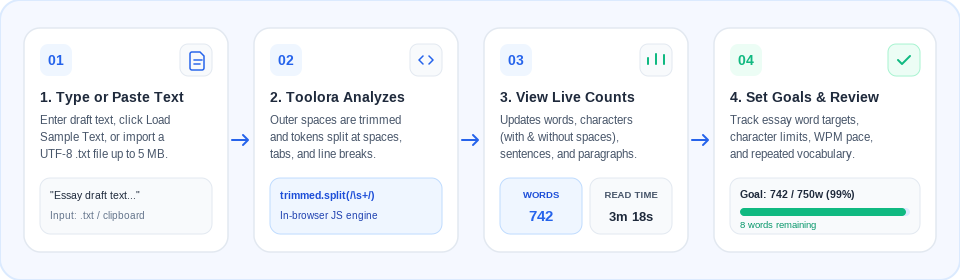
How Word, Character, Sentence & Readability Counting Works
Different word processors (Microsoft Word, Google Docs, character-limited social portals) can report slightly different counts on the same draft. Here is the exact counting logic used by this tool:
Word Tokenization (Whitespace Splitting)
Trimmed text is split on one or more contiguous whitespace characters (trimmed.split(/\s+/).filter(Boolean)). Standard contractions ("don't", "it's"), hyphenated compounds ("well-known"), numbers ("2026"), and URLs without spaces count as 1 word each. Scripts written without spaces between words (such as Chinese, Japanese, or Thai) are counted by whitespace blocks rather than dictionary segmentation.
Characters (With Spaces) vs. No Spaces & Unicode / Emojis
Characters measures JavaScript UTF-16 code units (text.length), which counts every letter, digit, punctuation mark, space, tab, and line break. No Spaces strips all whitespace first (text.replace(/\s+/g, "").length). Note that supplementary Unicode characters and multi-codepoint emojis (such as 👨👩👧👦 or 👍) consist of 2 or more UTF-16 code units; if you need exact UTF-8 byte lengths, use our Character Counter.
Sentences, Paragraphs & Flesch Reading Ease
Sentences are counted by splitting on terminal punctuation (. ! ?) and keeping segments with at least 2 characters. Paragraphs count non-empty line blocks separated by line breaks. Once a draft contains at least 10 words and 1 sentence, the tool calculates the English Flesch Reading Ease formula: 206.835 − 1.015 × (words ÷ sentences) − 84.6 × (estimatedSyllables ÷ words), clamped from 0 to 100.
Supported File Import (.TXT Only) & Scope
The Import .txt button reads plain UTF-8 text files (.txt) up to 5 MB directly via the browser FileReader API. For PDF or Word (.docx) documents, copy and paste your text into the editor. This utility does not perform grammar checking, spell checking, plagiarism scanning, or AI-writing detection.
Common Questions About Word Counter
Why do hyphenated words and contractions count as one word?
Because the counter splits text on whitespace (spaces, tabs, and line breaks), any unbroken string of characters such as "state-of-the-art" or "wouldn't" is evaluated as a single word token, matching standard web form and academic word counters.
When should I use Word Counter vs. Reading Time Calculator or Character Counter?
Use Word Counter for full essay and article drafting (word goals, word frequency, Flesch readability, and .txt import/export). Use Character Counter when auditing UTF-8 byte sizes and social/SEO character limits, or Reading Time Calculator for a focused side-by-side comparison of 225 WPM reading, 130 WPM speaking, 300 WPM skimming, and custom WPM durations.
Related Free Tools
Explore more browser-based tools in Daily & Text Utilities or browse the complete All Tools Directory.
Count characters with and without spaces, words, lines, and UTF-8 byte size with a customizable character limit bar.
Count sentences, words, paragraphs, and characters in text with average words per sentence and Flesch Reading Ease score.
Estimate silent reading time, public speaking time, and fast skimming duration from pasted text with a custom WPM control.
Clean messy text online: remove multiple spaces, trim line starts and ends, remove empty lines, strip HTML tags, join into a single line, or strip non-ASCII characters.